Why Trekker
AI coding agents work better when they can track their own progress. A simple CLI-based task manager keeps them on the right path across sessions.
I built this after using Beads for a while. Beads does the job, but its codebase has grown quickly without enough care for what is happening inside. A task tracker is a simple application. It should not need thousands of lines of code.
My concerns about the future and security of that project led me here. Trekker is my simplified alternative.
I built this with AI assistance, but I did it for myself. That means I put enough care into it to make it reliable for my own work.
Prerequisites
You need the Bun runtime. Trekker uses bun:sqlite for database operations. This makes every command respond instantly.
macOS/Linux
curl -fsSL https://bun.sh/install | bashWindows
powershell -c "irm bun.sh/install.ps1 | iex"Via npm
npm install -g bunInstallation
Using bun (recommended)
bun install -g @obsfx/trekkerUsing npm
npm install -g @obsfx/trekkerFeatures
- Tasks, epics, subtasks, and dependencies
- Full-text search across all items
- Filter by type, status, or priority
- Kanban board via separate dashboard package
- Stores everything in a local
.trekkerfolder - TOON output format for AI token efficiency
Claude Code Plugin

Give Claude Code direct access to Trekker with 26 MCP tools, 13 slash commands, 7 skills, and an autonomous task agent.
Install
claude plugin marketplace add obsfx/trekker-claude-codeclaude plugin install trekkerKey Features
- Persistent task memory across sessions via SQLite
- Search-first workflow to restore context
- 7 skills for guided workflows and best practices
- 5 lifecycle hooks for automatic state management
- Autonomous task agent for discovery and completion
- Blocks internal TaskCreate/TodoWrite — enforces Trekker
- Multi-instance safe with conflict handling
Slash Commands
/trekker:prime-Load workflow context/trekker:create-Create task interactively/trekker:list-List tasks with filters/trekker:show-Show task details/trekker:ready-Find unblocked tasks/trekker:start-Begin working on a task/trekker:done-Complete with summary/trekker:blocked-Mark task as blocked/trekker:comment-Add a comment to a task/trekker:deps-Manage dependencies/trekker:epic-Manage epics/trekker:history-View audit log/trekker:task-agent-Run autonomous agentHooks
5 lifecycle hooks run automatically to manage state across sessions.
SessionStart-Loads trekker state and recent activity into contextPreCompact-Preserves task state before context window compactionPreToolUse-Blocks internal TaskCreate/TodoWrite to enforce TrekkerStop-Saves progress when session endsSubagentStop-Captures subagent work back into trekkerSkills
7 skills guide the agent through workflows and best practices.
trekker-Persistent task memory for AI agents across sessionsplanning-Plan and track multi-step tasks before implementationsearch-Search-first context gathering before any actionsmart-query-Natural language task querying with FTS5 searchfind-duplicates-Detect and prevent duplicate tasks before creationtask-sync-Synchronize Trekker with Claude's built-in TodoWriteissue-tracking-Auto-suggest Trekker when issues or bugs are mentionedAutonomous Task Agent
The /trekker:task-agent command launches an autonomous agent that finds ready tasks, works on them, and marks them complete. It picks up unblocked tasks in priority order and leaves comments as it progresses.
Quick Start
Initialize your project
trekker initCreate an epic
trekker epic create -t "User Authentication" -d "JWT-based auth"Add tasks to the epic
trekker task create -t "Create user model" -e EPIC-1trekker task create -t "Build login endpoint" -e EPIC-1Establish dependencies (TREK-2 depends on TREK-1)
trekker dep add TREK-2 TREK-1Update task status
trekker task update TREK-1 -s in_progresstrekker task update TREK-1 -s completedCommands
Project Management
trekker inittrekker wipetrekker quickstartEpics
trekker epic create -t "Epic title" [-d "description"] [-p 0-5]trekker epic list [--status todo|in_progress|completed|archived]trekker epic show EPIC-1trekker epic update EPIC-1 -s in_progresstrekker epic complete EPIC-1trekker epic delete EPIC-1Tasks
trekker task create -t "Task title" [-d "desc"] [-p 0-5] [-e EPIC-1] [--tags "tag1,tag2"]trekker task list [--status todo|in_progress|completed|wont_fix|archived] [--epic EPIC-1]trekker task show TREK-1trekker task update TREK-1 -s in_progresstrekker task delete TREK-1Subtasks
trekker subtask create TREK-1 -t "Subtask title" [-d "desc"] [-p 0-5]trekker subtask list TREK-1trekker subtask update TREK-1-1 -s completedtrekker subtask delete TREK-1-1Comments
trekker comment add TREK-1 -a "agent" -c "Progress note"trekker comment list TREK-1trekker comment update CMT-1 -c "Updated content"trekker comment delete CMT-1Dependencies
trekker dep add TREK-2 TREK-1trekker dep remove TREK-2 TREK-1trekker dep list TREK-1Status & Priority
Priority Scale
| Priority | Label |
|---|---|
| 0 | Critical |
| 1 | High |
| 2 | Medium (default) |
| 3 | Low |
| 4 | Backlog |
| 5 | Someday |
Status Values
Tasks: todo, in_progress, completed, wont_fix, archived
Epics: todo, in_progress, completed, archived
ID Formats
- Epics:
EPIC-1,EPIC-2, ... - Tasks:
TREK-1,TREK-2, ... - Comments:
CMT-1,CMT-2, ...
Search
Search across all tasks, epics, subtasks, and comments using FTS5.
trekker search "authentication"trekker search "bug fix" --type task,subtasktrekker search "login" --type comment --status completedtrekker search "query" [--type types] [--status status] [--limit n] [--page n]History
View an audit log of all changes.
trekker historytrekker history --entity TREK-1trekker history --type task,epic --action create,updatetrekker history --since 2024-01-01 --until 2024-12-31Unified List View
trekker listtrekker list --type task,epictrekker list --status todo,in_progresstrekker list --priority 0,1,2trekker list --sort priority,created_atTOON Output Format
Use the --toon flag to get structured output that uses fewer tokens.
trekker --toon task listtrekker --toon task show TREK-1Dashboard
A kanban board that reads from your .trekker database.
npm install -g @obsfx/trekker-dashboardtrekker-dashboard -p 3000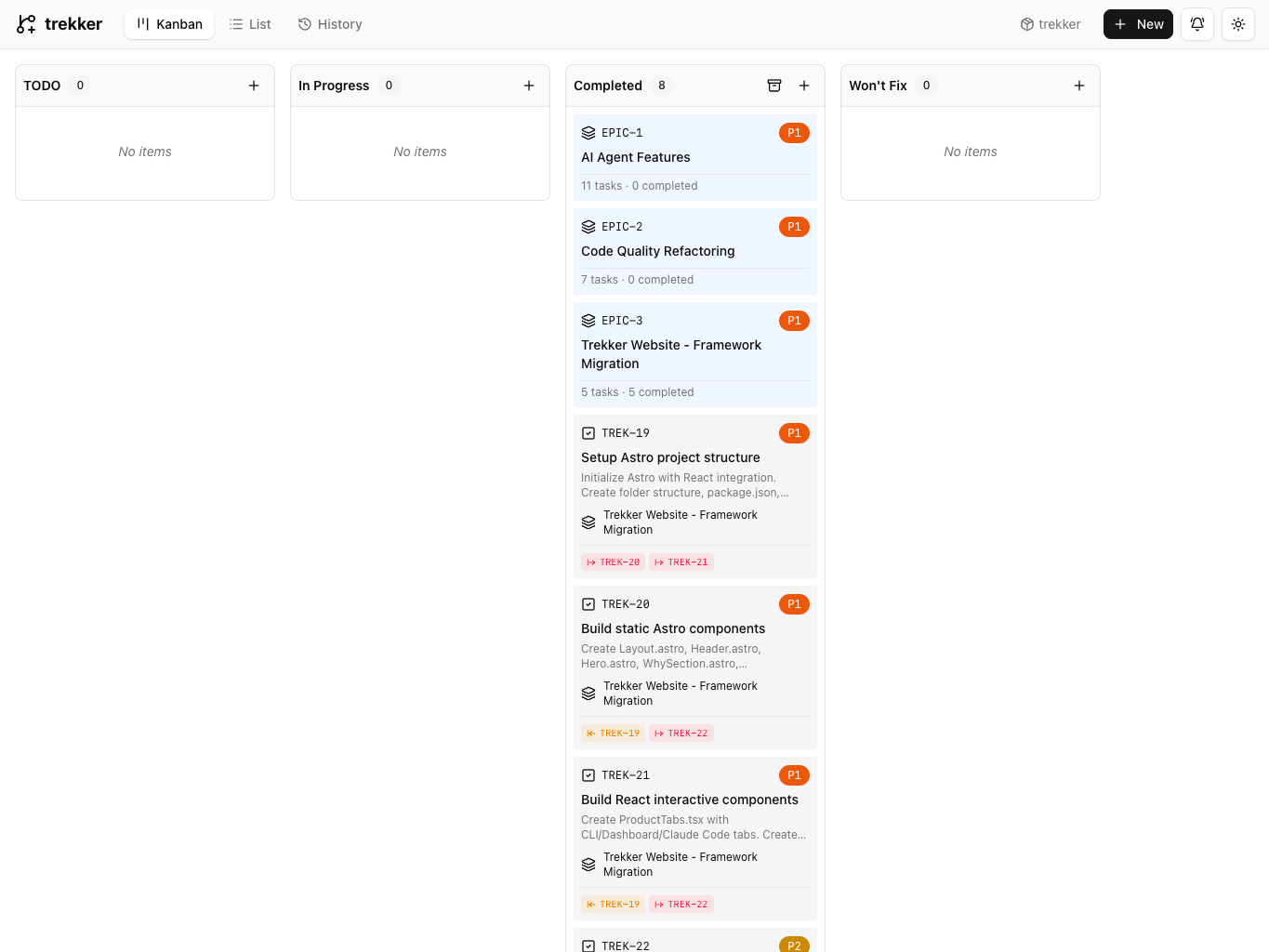
Trekker Dashboard - Kanban View
Data Storage
Trekker creates a .trekker folder in your project root. Add it to .gitignore if you do not want to track it.
AI Agent Workflow
- 1Install the Claude Code plugin
- 2Tell the agent to use Trekker in your prompt
- 3Point the agent to
trekker quickstartfor reference - 4Open the dashboard to watch progress
Example prompt:
Use trekker to track your work. Run `trekker quickstart` if you need to learn how it works.